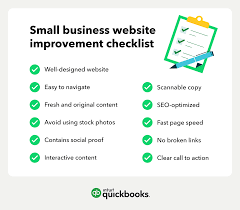

Creating a website is one of the most important steps for any business today. Whether you own a local shop, startup, service company, or online store, your website acts as your digital storefront. A professional website helps customers find your business, trust your brand, and contact you easily.
For beginners, building a website may feel confusing because there are many things to manage, including design, content, SEO, security, and mobile optimization. This is why having a proper small business website checklist can save time and help you avoid common mistakes.
This guide explains everything beginners need to launch a successful business website step by step.
Why a Website Matters for Small Businesses
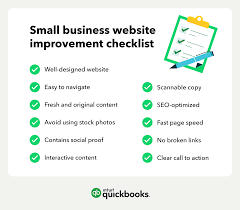
A website gives your business online visibility. Most customers search online before buying products or services. Without a website, your business may lose credibility and potential sales.
A business website helps you:
- Build trust with customers
- Showcase products or services
- Generate leads and sales
- Improve online visibility
- Compete with larger businesses
- Offer customer support and contact information
- Grow your brand online
Even a simple website can create a strong first impression when designed correctly.
Choose the Right Domain Name
The first step in your small business website checklist is selecting a domain name. Your domain is your website address, such as www.yourbusiness.com.
Tips for Choosing a Good Domain
- Keep it short and easy to remember
- Use your business name if possible
- Avoid numbers and special characters
- Choose a .com extension when available
- Make it easy to spell and pronounce
A clear and professional domain name helps customers remember your business.
Select Reliable Web Hosting
Web hosting stores your website files and makes your site accessible online.
What to Look for in Hosting
- Fast loading speed
- Good uptime guarantee
- Security features
- Customer support
- Easy WordPress installation
- Affordable pricing
Popular hosting providers for beginners include Bluehost, Hostinger, SiteGround, and DreamHost.
Pick the Right Website Platform
Your website platform determines how you create and manage your site.
Popular Website Builders
WordPress
WordPress is the most popular platform because it is flexible, SEO-friendly, and beginner-friendly.
Shopify
Best for eCommerce businesses selling products online.
Wix
Easy drag-and-drop builder suitable for beginners.
Squarespace
Known for beautiful templates and simple setup.
Choose the platform based on your business needs and technical skills.
Use a Professional Website Design
Website design affects how visitors view your business. A clean and modern design increases trust and engagement.
Important Design Tips
- Use simple layouts
- Choose readable fonts
- Use high-quality images
- Maintain consistent branding
- Avoid cluttered pages
- Use your business colors and logo
Your website should look professional and easy to navigate.
Make Your Website Mobile-Friendly
Most users browse websites on smartphones today. Mobile responsiveness is an essential part of every small business website checklist.
A mobile-friendly website should:
- Adjust properly on all screen sizes
- Load quickly on mobile devices
- Have readable text without zooming
- Include clickable buttons and menus
Google also ranks mobile-friendly websites higher in search results.
Create Essential Website Pages
Every small business website should include important pages that customers expect to see.
Home Page
Your homepage should explain what your business offers and encourage visitors to take action.
Include:
- Business introduction
- Services or products
- Clear call-to-action buttons
- Testimonials
- Contact details
About Us Page
Customers want to know who they are buying from. Share your story, mission, and experience.
Services or Products Page
Clearly explain your offerings with descriptions, pricing, and benefits.
Contact Page
Make it easy for customers to contact you.
Include:
- Phone number
- Email address
- Business location
- Contact form
- Google Maps integration
Blog Page
A blog helps improve SEO and builds authority in your industry.
Focus on Website Speed
A slow website can drive visitors away. Fast-loading websites improve user experience and search engine rankings.
Ways to Improve Website Speed
- Compress images
- Use caching plugins
- Choose fast hosting
- Minimize unnecessary plugins
- Use optimized website themes
Ideally, your website should load within 2 to 3 seconds.
Add Clear Calls-to-Action
Calls-to-action encourage visitors to take the next step.
Examples include:
- Contact Us
- Book Now
- Get a Free Quote
- Shop Now
- Subscribe Today
Place CTA buttons throughout your website to increase conversions.
Optimize Your Website for SEO
SEO helps your website appear in search engine results. This is one of the most important sections of a small business website checklist.
Basic SEO Tips
- Use keywords naturally
- Write unique page titles
- Add meta descriptions
- Use heading tags properly
- Optimize images
- Create quality content
- Build internal links
SEO takes time but can generate long-term organic traffic.
Use the Keyword Naturally
When creating content, include the keyword small business website checklist naturally throughout your pages and blog posts. Avoid keyword stuffing because it can hurt SEO performance.
Search engines prefer helpful and human-friendly content.
Secure Your Website
Website security protects your business and customer information.
Important Security Features
- Install SSL certificate
- Use strong passwords
- Keep plugins updated
- Backup your website regularly
- Use security plugins
An SSL certificate also displays the padlock icon in browsers, increasing customer trust.
Set Up Google Analytics
Google Analytics helps track website performance and visitor behavior.
You can monitor:
- Website traffic
- User locations
- Popular pages
- Conversion rates
- Bounce rates
This data helps improve your website over time.
Connect Social Media Accounts
Social media integration helps increase engagement and brand visibility.
Add links to platforms such as:
- YouTube
- X (Twitter)
You can also add social sharing buttons to blog posts.
Add Customer Reviews and Testimonials
Positive reviews help build trust with potential customers.
Where to Display Testimonials
- Homepage
- Service pages
- Product pages
- Dedicated testimonial section
Real customer experiences improve credibility and conversions.
Include Professional Images
Visual content makes your website more attractive and engaging.
Best Practices for Images
- Use original photos if possible
- Avoid blurry images
- Optimize file sizes
- Use images relevant to your business
Professional visuals create a better user experience.
Create Easy Navigation
Visitors should easily find information on your website.
Navigation Tips
- Keep menus simple
- Limit main menu items
- Use clear page names
- Add search functionality if needed
Good navigation improves usability and keeps users on your site longer.
Add Contact Forms
Contact forms allow visitors to reach you quickly.
A simple contact form should ask for:
- Name
- Phone number
- Message
Keep forms short and user-friendly.
Enable Local SEO
Local SEO helps nearby customers find your business online.
Local SEO Checklist
- Create a Google Business Profile
- Add business address
- Use local keywords
- Collect customer reviews
- Add location pages if necessary
Local SEO is especially important for restaurants, salons, clinics, and service businesses.
Test Your Website Before Launch
Always test your website before making it live.
Website Testing Checklist
- Check mobile responsiveness
- Test all links
- Verify contact forms
- Check loading speed
- Fix spelling mistakes
- Test browser compatibility
A properly tested website creates a better first impression.
Keep Your Website Updated
A website is not a one-time project. Regular updates help maintain security, SEO, and user experience.
Regular Maintenance Tasks
- Update plugins and themes
- Publish fresh blog content
- Backup website files
- Monitor analytics
- Check broken links
Consistent maintenance keeps your website performing well.
Common Mistakes Beginners Should Avoid
Many beginners make avoidable mistakes when creating a business website.
Ignoring Mobile Optimization
A non-mobile-friendly website can lose customers quickly.
Using Too Much Text
Keep content clear and easy to read.
Poor Quality Images
Low-quality visuals reduce professionalism.
No SEO Strategy
Without SEO, your website may struggle to attract visitors.
Slow Website Speed
Visitors often leave slow websites within seconds.
Avoiding these mistakes helps create a stronger online presence.
Benefits of Following a Small Business Website Checklist
Using a proper small business website checklist helps beginners stay organized and build a professional website successfully.
Major Benefits
- Better user experience
- Improved SEO rankings
- Higher conversion rates
- Stronger online credibility
- Increased customer engagement
- Better website performance
A structured approach saves time and prevents costly errors.
Final Thoughts
Launching a business website may seem challenging at first, but following a clear small business website checklist makes the process much easier. A professional website helps customers trust your business, improves online visibility, and supports long-term growth.
Focus on user experience, mobile responsiveness, SEO, website speed, and valuable content. Even beginners can create an effective website by following the right steps.
Remember that your website represents your brand online. Investing time into creating a high-quality website can lead to better customer engagement, more leads, and increased sales in the future.
FAQ
What is a small business website checklist?
A small business website checklist is a step-by-step guide that helps business owners create a professional, secure, and SEO-friendly website for their business.
Why is a website important for small businesses?
A website helps businesses build credibility, attract customers, improve online visibility, and increase sales through digital marketing.
Which platform is best for beginners?
WordPress is one of the best platforms for beginners because it is flexible, affordable, and SEO-friendly.
How much does a small business website cost?
The cost depends on hosting, domain, design, and features. Basic websites can start from $50 to $500, while advanced websites may cost more.
How can I improve my website SEO?
You can improve SEO by using keywords, creating quality content, optimizing images, improving website speed, and building backlinks.
How often should I update my website?
You should regularly update your website with fresh content, plugin updates, security checks, and performance improvements.
Do I need a mobile-friendly website?
Yes, mobile-friendly websites are essential because most users browse the internet using smartphones and tablets.
What pages should every business website include?
Every business website should include a Home page, About page, Services or Products page, Contact page, and Blog section.